A keyboard and mouse may look like simple office equipment, but most people use them for hours every day. Typing, moving between windows, browsing websites, managing files, and entering data all involve repeated hand movements. Over a full workday, small differences in keyboard and mouse design can make a noticeable difference to everyday comfort.
That is why ergonomic keyboard and mouse design deserves more attention. Good ergonomics does not simply mean adding a curved shape or a padded wrist rest. It means considering how the hands, wrists, and forearms move during normal computer use. MOFii applies this approach to an ergonomic wireless keyboard and mouse combo designed for office work, remote work, study, and everyday computing.
Ergonomics Starts With Hand Position
Most people do not think about hand position while typing. They place their hands on the keyboard and focus on the work in front of them. However, an awkward keyboard layout can force the hands and wrists into the same uncomfortable position for hours.
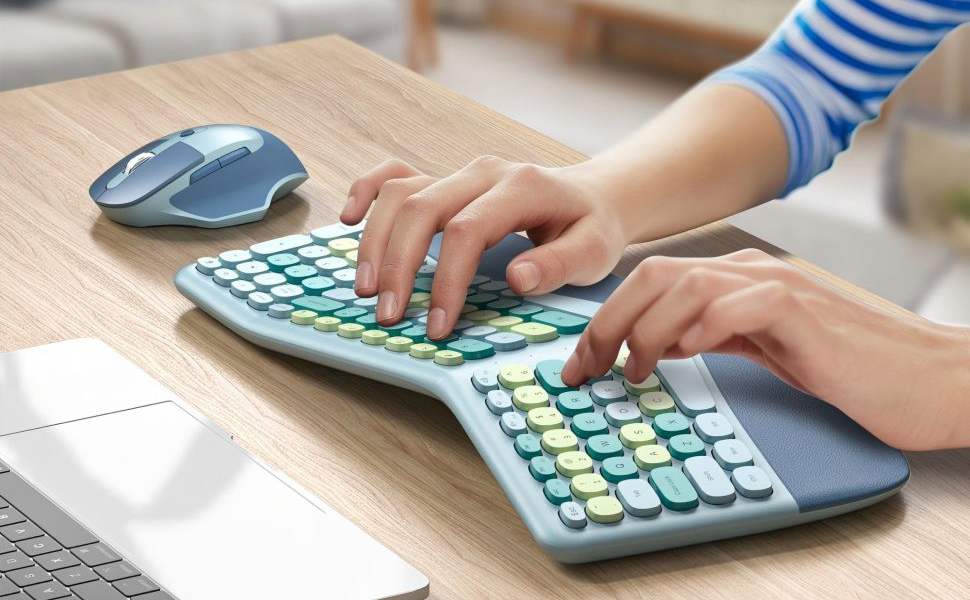
The MOFii keyboard uses a split curved layout that follows the natural position of the hands. The design gives each hand more space and encourages a relaxed position for the hands, wrists, and forearms.
This approach works particularly well for people who spend much of their day writing emails, preparing documents, working with spreadsheets, or studying. Instead of asking users to adapt to an unusual keyboard shape, the layout aims to make everyday typing feel more natural.

A Comfortable Wrist Rest Completes the Keyboard
The keyboard layout is only part of the ergonomic experience. The wrists also need a comfortable place to rest during and between typing sessions.
MOFii integrates a 3-layer memory foam wrist rest directly into the keyboard. The wrist rest combines a soft synthetic leather surface, high-density cushioning foam, and a memory foam core that follows the shape of the wrists.
Each layer serves a practical purpose. The outer surface provides a soft contact area, the buffer foam adds cushioning, and the memory foam core provides deeper support. Together, they create a stable resting area without requiring a separate wrist pad on the desk.
For users who spend most of their working day at a computer, this type of integrated support can make the overall setup feel more comfortable and complete.
The Mouse Matters Just as Much
An ergonomic keyboard cannot solve every comfort issue on its own. Users move between the keyboard and mouse constantly, so the mouse also needs to fit naturally into the workflow.
The ergonomic wireless mouse in the MOFii combo offers three DPI settings: 1200, 1600, and 2400 DPI. Users can choose a sensitivity level that suits their screen size, working habits, and preferred cursor movement.
The mouse also includes forward and back buttons on the side. These controls come in handy when browsing websites, moving through folders, or managing files. Instead of repeatedly moving the cursor to on-screen controls, users can handle common navigation tasks directly from the mouse.
These details may seem small, but everyday ergonomics often comes down to reducing unnecessary movements rather than adding complicated features.
2.4G Wireless Keeps the Setup Simple
A comfortable workspace also needs to stay practical. Too many cables can make a desk feel crowded, especially when users move between different work areas.
The MOFii keyboard and mouse use 2.4G wireless connectivity through one USB receiver. Users can plug the receiver into a compatible computer and start working without installing additional drivers or software.
One receiver handles both devices, which keeps the connection process simple and reduces cable clutter. The mouse also provides a storage compartment for the receiver inside its battery area, making the entire set easier to carry between home, office, and other workspaces.

Full-Size Layout for Everyday Productivity
Compact keyboards can save desk space, but they do not always suit people who work with numbers or productivity software. Office users often rely on the number pad, function keys, and navigation controls throughout the day.
The MOFii keyboard keeps a full-size layout with a dedicated number pad, function keys, and navigation cluster. This familiar arrangement makes it easier to move between different tasks without changing established typing habits.
For an ergonomic keyboard and mouse set, this balance matters. A keyboard should provide a more comfortable working position without taking away the functions people use every day.
Built for More Than Office Work
Modern computer use does not happen in one fixed location. Someone may work from an office in the morning, continue from a home desk in the afternoon, and use the same computer setup for study or personal tasks in the evening.
The MOFii wireless keyboard and mouse combo works with Windows and Mac systems, as well as desktop PCs, laptops, and all-in-one computers. The wireless receiver also stores inside the mouse, so users can pack the set away without carrying a separate receiver. This makes the combination suitable for remote work, office tasks, online study, browsing, document editing, and other everyday computing needs.

What Should You Look for in an Ergonomic Keyboard and Mouse?
Not every ergonomic design will feel the same for every user. Hand size, typing habits, desk height, monitor setup, and the type of work all influence personal comfort.
When choosing an ergonomic keyboard and mouse, look at how the two devices work together rather than judging them only by appearance. The keyboard should give the hands a natural working position, while the wrist rest should provide useful support. The mouse should feel comfortable in the hand and offer enough control for different tasks.
Practical features also matter. Wireless connectivity, keyboard layout, DPI adjustment, operating-system compatibility, and portability can determine whether a product works well in a real workspace.
| Feature | What It Brings to Everyday Use |
|---|---|
| Split curved layout | Supports a more natural hand position while typing |
| 3-layer memory foam wrist rest | Adds cushioned support for the wrists |
| 1200 / 1600 / 2400 DPI | Lets users adjust cursor sensitivity |
| 2.4G wireless connection | Keeps the desktop setup simple and cable-free |
| Full-size keyboard | Supports data entry and productivity tasks |
| One USB receiver | Connects both keyboard and mouse |
| Windows and Mac compatibility | Works across common computer systems |
| Receiver storage | Makes the set easier to carry between workspaces |
MOFii Brings Ergonomics Into Everyday Computing
Ergonomic design does not need to make a keyboard and mouse complicated. The most useful improvements often come from details that people notice only after using them for several hours: a keyboard that follows the hands more naturally, a wrist rest that provides real support, and a mouse that feels comfortable during repeated movements.
MOFii brings these ideas together in its ergonomic wireless keyboard and mouse combo. The split curved layout, 3-layer memory foam wrist rest, adjustable mouse DPI, full-size keyboard, and 2.4G wireless connection all serve the same purpose: making everyday computer use more comfortable without sacrificing practicality. For office professionals, remote workers, students, and home users, a well-designed ergonomic keyboard and mouse can become a simple but meaningful part of a better workspace.