Number entry looks simple until you have to do it for several hours a day. Entering figures into spreadsheets, checking invoices, recording financial data, or updating databases can involve hundreds or even thousands of keystrokes. When the number keys are difficult to reach or the layout does not match the way you naturally move your hand, small inefficiencies can quickly become part of the daily workflow.
This is one reason a dedicated number keypad still has a place in modern computer setups. A separate numeric keypad gives users a larger, more focused area for number entry without requiring a full-size keyboard. However, simply adding more keys does not automatically make data entry better. The layout, key position, typing angle, feedback, and overall size all influence how the keypad feels during real use.
For users who work with numbers regularly, these design details can matter just as much as the wireless connection or appearance of the device.
Why Number Keypad Design Matters for Data Entry
People who work with numbers often develop a consistent rhythm. The hand moves between digits, arithmetic symbols, Enter, and navigation keys without much conscious thought. A well-designed numeric keypad supports this rhythm by keeping frequently used keys within a predictable and comfortable reach.
By contrast, an awkward layout can interrupt the process. Users may need to look down more often, move their hand farther between keys, or adjust their wrist position repeatedly. These interruptions may seem insignificant during a short task, but they become more noticeable during long spreadsheet or accounting sessions.
A dedicated keypad also changes the relationship between the keyboard and mouse. Users can place the number pad wherever it feels most convenient instead of being tied to the fixed position of the numeric section on a full-size keyboard. For compact laptop and tenkeyless keyboard users, this flexibility can make a meaningful difference.

Key Layout Has a Direct Impact on Workflow
The arrangement of the keys is one of the first things to consider when choosing a number pad for data entry. A familiar numeric layout allows users to rely on established finger movements instead of learning a completely different arrangement.
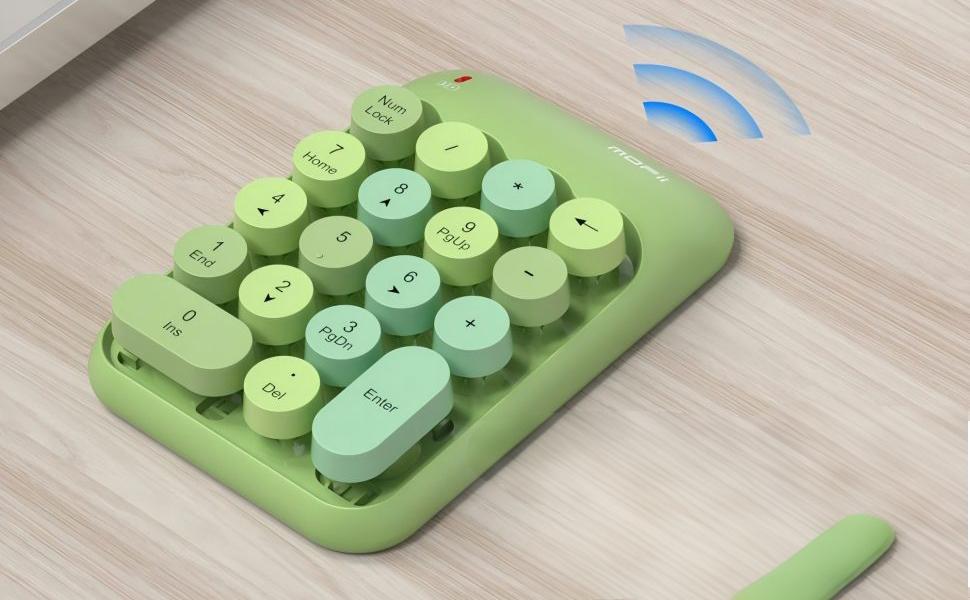
For everyday office work, the number section needs more than digits alone. Operators may also need arithmetic symbols, Num Lock, Enter, Delete, and navigation controls such as Home, End, Page Up, and Page Down. An 18-key layout can provide this additional functionality without making the device unnecessarily large. This balance works particularly well for users who want the efficiency of a dedicated numeric section while keeping their desk setup compact. The goal is not simply to fit as many keys as possible. It is to arrange the most useful functions where users can reach them naturally.
Typing Angle Can Influence Everyday Comfort
The physical position of the hand matters just as much as the key arrangement. A completely flat keypad may work perfectly well for short tasks, but users who spend a large part of the day entering numbers may notice the difference when the device provides a slight typing angle.
A modest tilt can change how the wrist approaches the keys. The hand does not need to remain completely flat against the desk, and the keypad can feel more natural during repeated input.
MOFii uses a 10° ergonomic tilt on its wireless number pad. Rather than treating the angle as a decorative design element, the idea is to create a more comfortable working position for routine number entry.
Of course, ergonomics is personal. Desk height, hand size, typing habits, and seating position all influence how a particular angle feels. A good design should provide a natural starting position without forcing the user into a rigid posture.

Key Feedback Matters More Than It Seems
When entering numbers quickly, users rely on more than visual confirmation. The physical response from each key also tells the fingers whether the input has registered. Keys that feel inconsistent can make fast data entry less predictable. On the other hand, clear and responsive feedback helps users maintain a steady rhythm without needing to press each key harder than necessary.
Noise is another consideration in shared environments. A number pad used in an office, library, classroom, or home workspace should not create unnecessary distraction every time a user enters a series of figures.
MOFii combines responsive key feedback with a quiet click mechanism. This approach suits users who need to enter numbers regularly while working around colleagues, classmates, or family members.

A Wireless Number Pad Gives Users More Freedom
A dedicated wireless number pad has another advantage that a fixed numeric section cannot offer: placement flexibility. For example, a laptop user can keep the keyboard centered in front of the monitor while placing the number pad to the side. A right-handed user may prefer the keypad on the right, while another user may move it closer when entering a large amount of data and move it away when switching back to writing or browsing.
This separation also helps compact setups. Many laptops and smaller keyboards omit a dedicated numeric section to save space. Adding a separate wireless numeric keypad provides the missing functionality without requiring users to replace their existing keyboard.
MOFii uses 2.4G wireless connectivity with a compact USB receiver. The setup does not require additional drivers or software, so users can connect the keypad to a compatible Windows laptop or desktop and start working.
Size Is Part of the Design
A number pad should provide enough space for comfortable operation without becoming another large object on the desk. This becomes particularly important for people who switch between different work locations. Remote workers may move between a home office and a temporary workspace, while students may carry their peripherals between a dormitory, library, and classroom.
MOFii keeps the wireless number pad at approximately 90 mm wide and 135 mm tall. Its compact footprint leaves more room for a laptop, mouse, notebook, or other desk accessories. The design also makes storage easier. When the keypad is not needed, it can fit into a desk drawer or laptop bag instead of taking up permanent workspace.

Battery Life and Daily Reliability Also Matter
A wireless device should not create more maintenance work than it saves. For a number pad used regularly, simple power management and a stable connection can make everyday use much easier.
MOFii’s wireless number pad runs on a single AAA battery. The keypad also uses four non-slip pads on its base to help keep it steady during repeated typing. These details may not appear in a specification comparison at first glance, but they affect the experience over time. A number pad should stay where the user puts it, connect without unnecessary steps, and remain ready when a task requires fast numerical input.
What Makes a Good Number Pad for Data Entry?
There is no single design that works perfectly for every user. Someone who occasionally enters numbers into a spreadsheet has different requirements from an accountant, financial analyst, or data-entry specialist who spends hours working with figures.
Still, several characteristics deserve attention when comparing a numeric keypad for data entry:
| Design Factor | Why It Matters |
|---|---|
| Familiar key layout | Helps users maintain established finger movements |
| Dedicated function keys | Supports calculations, navigation, and spreadsheet work |
| Ergonomic typing angle | Provides a more natural position for repeated input |
| Responsive key feedback | Helps users maintain a consistent typing rhythm |
| Quiet operation | Works better in shared or quiet environments |
| Wireless connectivity | Allows more flexible placement on the desk |
| Compact size | Makes the keypad easier to store and carry |
| Stable base | Prevents unwanted movement during fast typing |
The important point is that these features work together. A keypad with a familiar layout may still feel uncomfortable if the physical design is poor. Likewise, a beautifully designed device may not be useful if its key arrangement slows down the user’s normal workflow.
Who Can Benefit From a Dedicated Number Pad?
A separate number pad is particularly useful for people whose work involves frequent numerical input.
Accountants can use it for entering financial figures and reconciling records. Data analysts may rely on a dedicated numeric section when working with spreadsheets and datasets. Students can benefit when completing statistics, mathematics, or accounting assignments.
Remote workers also have a practical reason to use one. A compact laptop keyboard may be convenient for mobility, but it does not always provide the best setup for extended desk work. Adding a wireless number pad gives users a dedicated numerical workspace while allowing the main keyboard to remain compact.
The same principle applies to home users. If number entry is only an occasional task, a small separate keypad can provide the required functionality without taking up the space of a full-size keyboard.
MOFii Takes a Practical Approach to Number Keypad Design
The best number pad is not necessarily the one with the most features. For everyday data entry, the more important question is whether the design supports the way people actually work.
MOFii combines a familiar 18-key layout with a 10° ergonomic tilt, quiet key operation, 2.4G wireless connectivity, and a compact form factor. The result is a wireless number pad designed to add dedicated numerical input to laptops and compact keyboards without creating another bulky desktop accessory.
For accountants, students, data analysts, remote workers, and anyone who regularly works with spreadsheets, the value of a dedicated numeric keypad comes down to simple things: where the keys are, how they feel, how the hand moves, and how easily the device fits into the rest of the workspace. Good number keypad design does not try to change the way people work. It removes small obstacles from the workflow so that entering numbers becomes a more natural part of the job.