A computer mouse is probably one of the least noticeable things on a desk. You pick it up, move the cursor, click a few times, and get on with your work.
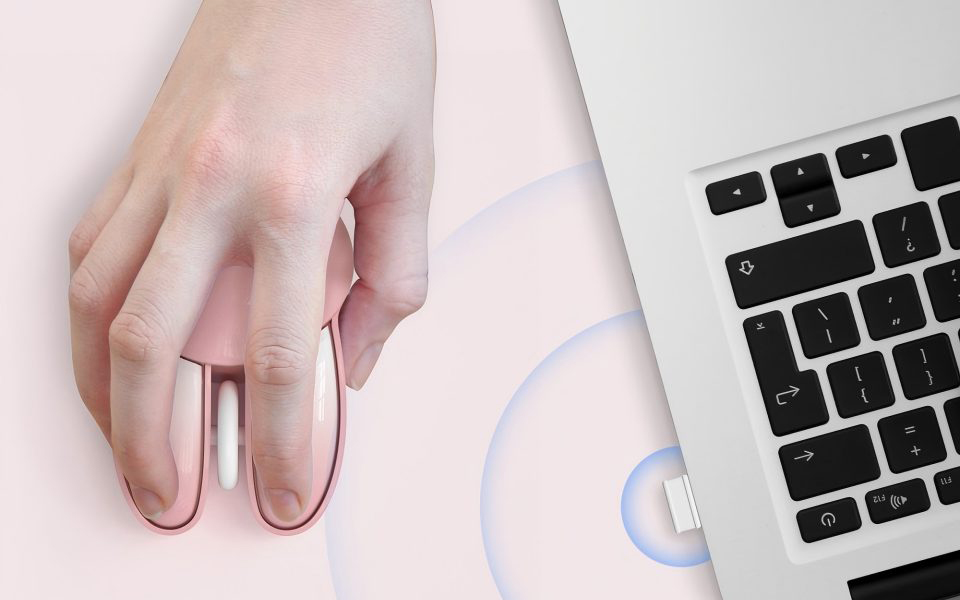
That is exactly why the details are easy to overlook. A mouse may be used hundreds of times during a normal work or study session. After a few hours, the shape, clicking sound, wireless connection, and even the way you store it can become much more noticeable than they seemed when you first bought it. MOFii takes a slightly different route with its bunny-shaped wireless mouse. The pink version is clearly designed to add some personality to a desk, but the interesting part is that the design is backed up by features intended for everyday use.
So, beyond the cute appearance, what actually makes this unique wireless mouse practical?
🐰 A Different Look for a Familiar Desk Accessory
Most computer mice look remarkably similar. Black, gray, simple curves, and a shape that is designed to disappear into the background. There is nothing wrong with that, especially in a conventional office. But a personal desk does not always need to look like an office.
MOFii’s rabbit-shaped design takes a different approach. The fresh color and recognizable bunny shape give the mouse a more playful appearance, while the pink version adds another bit of character to the setup.
It works particularly well for home desks, study areas, bedrooms, or anyone who simply does not want every accessory on the desk to look the same. And that is really where the design works best. It adds something to the desk without changing what the mouse is supposed to do.

🤫 The Clicking Sound Matters More Than You Might Expect
One mouse click is hardly noticeable. Hundreds of them are another story.
Think about a normal afternoon at a computer. You open a document, click through a few browser tabs, select a file, scroll through a page, move to another window, and start typing again. None of those actions takes much effort, but together they create a steady stream of clicks.
In a quiet environment, that sound can become surprisingly distracting. MOFii uses noiseless clicking to make the buttons softer and less intrusive. You still get the physical response of pressing a mouse button, but without the same sharp clicking noise of a traditional mouse. This is useful in places where people are working close to each other. A shared office, study room, bedroom, or late-night workspace does not always need another source of repetitive noise. The best thing about a quiet mouse is probably that you stop thinking about the sound altogether.
📡 Wireless Should Keep Things Simple
A wireless mouse is not particularly useful if connecting it becomes a project of its own. MOFii uses a 2.4G wireless connection with a USB receiver. It is plug and play, so there is no additional driver or complicated setup involved. Insert the receiver into the computer, turn on the mouse, and start using it. The working range can reach up to 33 feet, which is more than enough for ordinary desk work and gives you some freedom to move around. For most people, the real advantage of 2.4G wireless is simpler: there is no cable running across the desk. That leaves more freedom to position the mouse where it feels comfortable, move the laptop or keyboard around, or simply keep the workspace looking less cluttered.
🎒 Small Enough to Take With You
A desktop mouse does not necessarily need to stay on a desktop. Students move between classrooms and study spaces. Remote workers sometimes switch between a home office, dining table, and another room. People who travel with a laptop usually want accessories that do not take up half the bag.
The MOFii mouse uses a portable design that makes it easy to carry around. There is no cable to wind up and no bulky accessory case to find space for. Put the mouse in a laptop bag and it is ready for the next workspace. It is a small advantage, but one that becomes useful when you actually move your equipment around regularly.
🔋 What Happens When You Forget to Turn It Off?
Wireless accessories have one familiar weakness: batteries can disappear faster than expected when devices are left running. MOFii includes an automatic power-saving function to deal with that. After five minutes of inactivity, the mouse enters sleep mode. A click wakes it up again. There is also a physical On/Off switch for longer periods when the mouse will not be used. Nothing complicated here. The mouse simply knows when it has been sitting unused for a while. That is the kind of feature that is easy to ignore when reading a specification sheet, but useful when you are actually living with the product.

💻 Cute Does Not Mean Complicated
A distinctive computer accessory can sometimes look better than it works. That is not particularly useful. The bunny shape may be what catches your attention first, but daily use still comes down to the basics: Does it connect easily? Is it comfortable enough to use? Are the buttons annoying in a quiet room? Does it need constant battery management?
The MOFii mouse keeps those everyday requirements fairly straightforward.
It connects through 2.4G wireless, uses a USB receiver, automatically sleeps when idle, and keeps the clicking sound down. The unusual shape simply gives those practical functions a more playful exterior. In other words, you do not have to learn a different way of using a mouse just because this one looks different.
🌸 A Little Personality Can Change a Desk
There is also something to be said for enjoying the things you use every day. A computer desk can become very functional very quickly. Monitor, keyboard, mouse, charger, cables. Everything has a purpose, but the overall setup can still feel rather dull.
That is where a cute wireless mouse can make sense. The bunny shape and pink color are not performance features, and they do not need to be. Their job is simply to make the accessory feel more personal. For a study desk or home workspace, that can be enough. You do not always need a dramatic redesign. Sometimes one unusual accessory changes the feel of the whole setup.

🔌 One Compatibility Detail to Check
There is one thing worth checking before choosing this mouse: the type of USB port on your computer.
The MOFii mouse uses a USB receiver and is designed for Windows systems including Windows XP, Vista, Windows 7, 8, and 10. It works with computers that have a compatible USB port.
However, some MacBook Pro models and other devices that only have USB Type-C ports cannot directly use this type of receiver without an appropriate adapter or hub.
It is a small point, but an important one. A mouse can look perfect on your desk and still be inconvenient if the computer has nowhere to plug in its receiver.

Beyond the Bunny Shape
The rabbit design is obviously the first thing people notice about the MOFii mouse. But a good unique wireless mouse needs more than an unusual appearance to remain useful. Quiet buttons make it more suitable for shared and quiet spaces. 2.4G wireless connectivity keeps the setup simple. Automatic standby helps manage battery use. The compact design makes it easier to carry between different workspaces. The cute appearance is simply the part that makes the product different.
And perhaps that is the better way to think about it. A computer mouse does not have to be boring just because it is practical. It can be quiet, portable, easy to use, and still bring a little personality to an otherwise ordinary desk. ✨