Most people do not think much about their keyboard and mouse until something starts to feel wrong. Maybe your wrists feel tired after a long morning. Maybe you keep adjusting your hands while typing. Or perhaps the mouse starts to feel uncomfortable after several hours of moving between spreadsheets, browser tabs, and documents.
These things are easy to ignore because none of them usually happens all at once. It is the repetition that makes the difference.
A keyboard and mouse are among the most frequently used items on a desk. For people who spend much of the day in front of a computer, their shape, position, and overall design deserve more attention than they usually get.
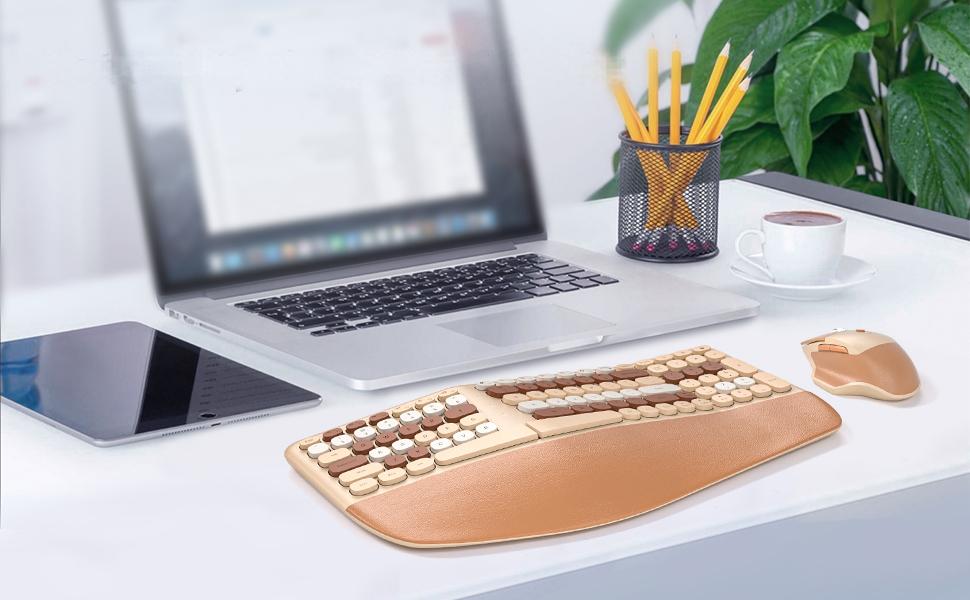
MOFii’s ergonomic wireless keyboard and mouse combo is designed around this everyday use rather than occasional computer work. The keyboard, wrist rest, and mouse are designed to work as one setup, with the aim of making long hours at the desk feel more natural.
The Keyboard Should Work With Your Hands
A flat keyboard is familiar and easy to use, but familiarity does not always mean comfort. When you type for several hours, your hands stay in roughly the same area for a long time. The way the keyboard positions your fingers and wrists can therefore become much more noticeable than it is during a short typing session. MOFii uses a split curved keyboard layout instead of a completely flat arrangement. The shape follows the natural position of the hands more closely, giving the wrists and forearms a more relaxed position while typing. It is a fairly simple change, but one that becomes more relevant the longer you use the keyboard. For someone answering emails for an hour, the difference may not be obvious. For someone spending most of the day writing, entering data, or working through documents, small changes in hand position can matter.

The Wrist Rest Is Not Just Extra Padding
A wrist rest can look like a cosmetic addition until you actually use one for a full day. The front of the MOFii keyboard has a padded wrist rest built with three layers: a soft synthetic leather surface, high-density cushioning, and a memory foam core that follows the shape of the wrist. The result is a softer transition between the desk and keyboard. Instead of having the wrists meet a hard edge, there is a broader surface underneath them. This is particularly useful during long typing sessions. The wrist rest does not do the typing for you, of course, but it gives your hands somewhere more comfortable to settle when they are not moving across the keys.
Your Mouse Gets Just as Much Use
It is easy to spend a lot of time choosing a keyboard and treat the mouse as an afterthought. In practice, the mouse gets almost as much daily use. Think about a normal work session. You type a few lines, move the cursor to a browser window, select something, scroll down, drag a file, then return to the keyboard. That cycle can repeat hundreds of times without you really noticing it. MOFii pairs the keyboard with an ergonomic wireless mouse rather than using a basic mouse simply to complete the set. It offers three DPI settings — 1200, 1600, and 2400 DPI — so cursor sensitivity can be adjusted according to the screen and task. The side buttons also provide forward and back navigation, which is handy when browsing or moving through files. None of these features is particularly complicated. That is part of the point. A good office mouse should make routine actions easier without making you think about the mouse itself.

Wireless Keeps Things Out of the Way
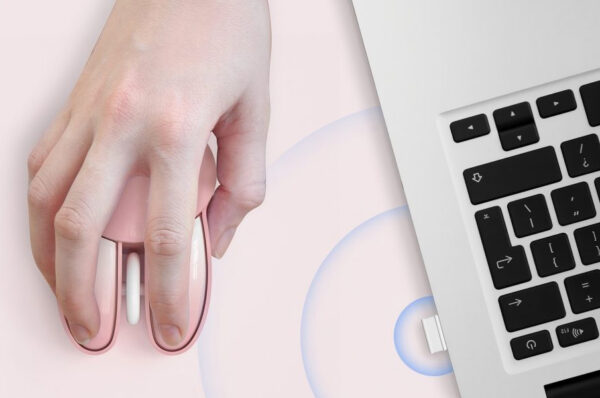
There is another part of the desktop experience that has nothing to do with wrist position: the cables. A keyboard cable is rarely a serious problem, but once a mouse cable, monitor cables, charging cables, and other accessories are added to the same desk, things can become messy fairly quickly. The MOFii set uses 2.4G wireless connectivity through a single USB receiver. Plug the receiver into the computer and both the keyboard and mouse are ready to use. There is no separate receiver for each device and no additional driver installation required. For a permanent home office, that keeps the desk cleaner. For someone moving between home and office, it also means there are fewer pieces to remember. The receiver can be stored inside the mouse’s battery compartment when the set is not in use, which is a small but useful detail for transport.

Full Size Still Makes Sense
Smaller keyboards look appealing on compact desks, but there are situations where a full-size layout is simply more practical. If your work involves spreadsheets, figures, documents, or frequent use of navigation keys, a dedicated number pad and full navigation cluster can save a surprising amount of time. The MOFii keyboard keeps those keys in place. It also includes the standard function-key row, giving users the familiar layout without having to rely on key combinations for everyday commands. For office work, this is less about having more keys and more about not having to think about where those keys are.
Comfort Should Not Mean Giving Up Productivity
An ergonomic keyboard sometimes gets treated as a specialist product, as if it only makes sense for people with very specific desk setups. It does not have to be that way.
A wireless keyboard and mouse set can simply be a more comfortable option for everyday computing. Someone working from home can use it for emails and spreadsheets. A student can use it for assignments and research. An office worker can leave it on the desk and use it throughout the day.
MOFii supports Windows and Mac systems and works with desktop PCs, laptops, and all-in-one computers, so the same set can move between different work environments without much adjustment.

The Difference Is in the Repetition
There is no single feature that suddenly makes a keyboard and mouse ergonomic. The curved keyboard affects how the hands sit. The padded wrist rest changes where the wrists can rest. The mouse shape and DPI settings influence cursor movement. Wireless connectivity removes cables from the desk. The full-size layout keeps familiar keys within easy reach.
Each detail is relatively small. What matters is that you interact with all of them repeatedly, every day.
That is probably the best way to understand an ergonomic wireless keyboard and mouse combo. It is not really about adding more technology to the desk. It is about paying attention to the things your hands do thousands of times during a normal workweek.
MOFii takes that approach with a setup designed for long hours of typing, clicking, scrolling, and switching between tasks. When the keyboard and mouse stop being something you notice, they are doing their job well.